
Configuring the proxies
Configuring the proxies in Firefox
In the Extras-menu select Options, then Advanced (the rightmost option), then Network: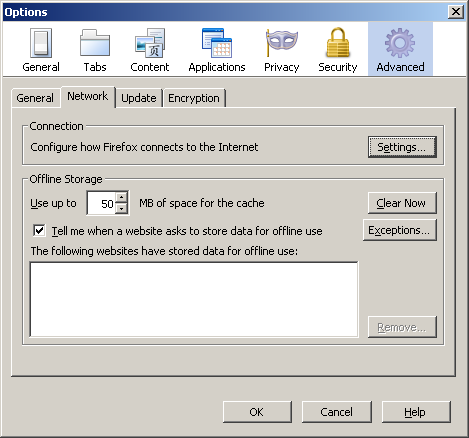
Click on Settings… and in the following window select Auto-detect proxy settings for this network :
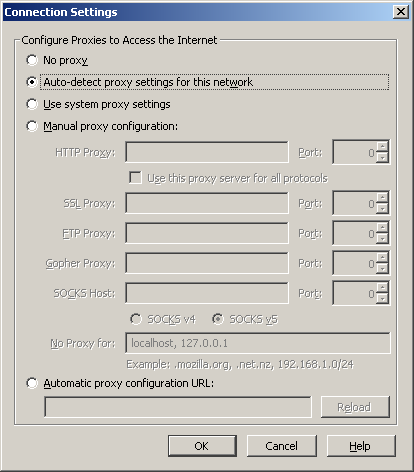
Click OK.
Configuring the proxies in Microsoft Internet Explorer
Open the Control Panel and select Internet options or select Settings… from the Internet Explorer's Extras-menu. Select Connections in the newly opened window: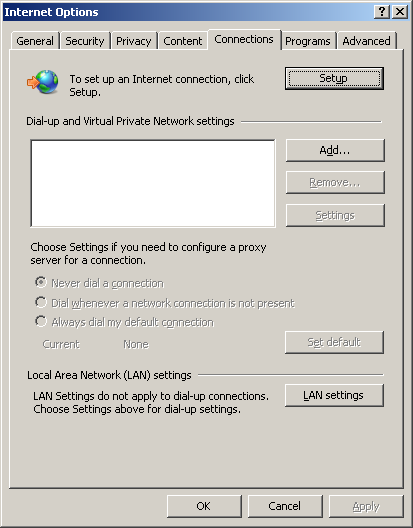
Click on LAN settings and check the box next to Automatically detect settings:
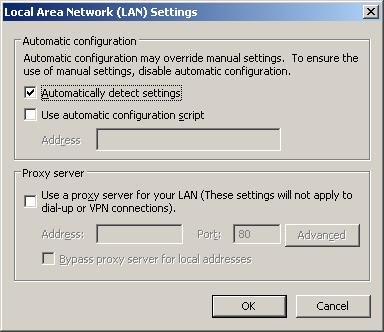
Click OK.
It may be necessary to restart the Internet Explorer before the changes take effect.
News
Gerd Faltings awarded Abel Prize 2026
Tingxiang Zou to lead a new Emmy Noether group
Tasho Kaletha awarded Chevalley Prize in Lie Theory 2026
Christoph Thiele awarded Brouwer Medal 2026
Christoph Thiele and Floris van Doorn awarded ERC Synergy Grant
Henning Heller receives Montucla Prize 2025
Thoralf Räsch receives Fakultät teaching award